


Telecom & Phone Systems
in TelecomDigital Office Systems
Monday to Friday 9:00 - 5:00
Business Phone Systems and VoIP Telecoms
Modernise your business communications with flexible cloud phone systems, VoIP, Microsoft Teams calling and professionally managed telecoms from Digital Office Group.
We design, install and support business phone systems for organisations of all sizes, helping employees communicate effectively from the office, home, mobile devices and multiple business locations.
Request a Free Telecoms ReviewBusiness Communications Built Around Your Organisation
Your phone system should make it easier for customers to contact your business and easier for employees to communicate wherever they are working.
Digital Office Group provides cloud-based VoIP, on-premise systems and Microsoft Teams calling, supported by suitable handsets, headsets, mobile applications and connectivity.
We review your current phone numbers, users, call flows, sites, broadband and contract commitments before recommending a suitable replacement.

Our business telecom services can include:
- Cloud VoIP phone systems
- Hosted business telephony
- Microsoft Teams Phone
- On-premise phone systems
- Business desk phones
- Desktop and mobile applications
- Call routing and auto attendants
- Call recording
- Voicemail-to-email
- Multi-site communications
- Business number porting
- Ongoing technical support
One Provider for Your Business Phone System
Business telecoms often involve several different services, including telephone numbers, handsets, internet connectivity, call recording and support.
We can bring these services together through one supplier, providing clearer accountability and one point of contact when changes or support are required.
Your phone system can also be reviewed alongside our business broadband and connectivity services .
Business Phone System Options
We provide several types of telephone system depending on your users, locations, infrastructure and preferred way of working.
Cloud VoIP Phone Systems
Flexible hosted telephony delivered through your internet connection, with desk phones and applications for computers and mobiles.
Microsoft Teams Phone
Add external calling to Microsoft Teams so employees can make and receive business calls through one familiar application.
On-Premise Phone Systems
Telephone equipment located at your premises for organisations requiring greater local control or specialist configurations.
Hybrid Phone Systems
Combine elements of cloud and on-premise telephony where operational or technical requirements demand it.
Mobile and Desktop Calling
Allow employees to use their business telephone number through mobile and desktop applications.
Multi-Site Telecoms
Connect multiple offices and locations through one phone system, shared directory and consistent call routing.
Cloud VoIP Business Phone Systems
A cloud-based VoIP phone system uses your internet connection to make and receive calls instead of relying on a traditional telephone exchange at your premises.
Users can operate from desk phones, computers and mobile applications, making cloud telephony suitable for offices, remote workers and multi-site organisations.
New users can normally be added without installing a large amount of additional hardware, helping the phone system grow with the business.
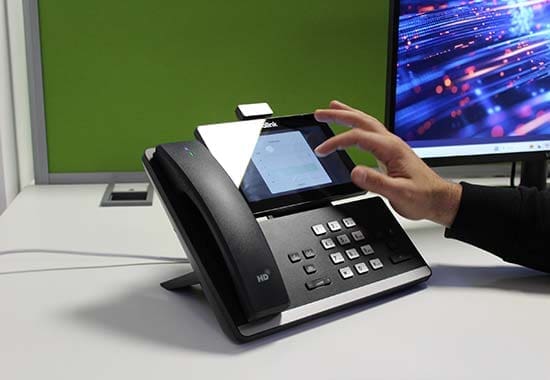
- Desk phones and cordless handsets
- Desktop calling applications
- Mobile applications
- Direct dial numbers
- Voicemail and voicemail-to-email
- Call forwarding and transfer
- Hunt groups and call queues
- Auto attendants
VoIP quality depends on the network supporting it
A modern cloud telephone system still requires suitable broadband, internal networking and properly configured equipment.
Poor connectivity, limited upload capacity or unsuitable Wi-Fi can cause unreliable or low-quality calls.
Is Your Internet Connection Ready for VoIP?
Before moving your calls to the cloud, we can review your current broadband, router, switches, Wi-Fi and network traffic.
This helps confirm whether the existing connection can support the expected number of simultaneous calls and whether a backup connection should be considered.
Where required, we can provide a managed router, leased line, fibre broadband or 4G and 5G resilience.
Features Available with Cloud Business Telephony
Auto Attendants
Present callers with menu options and route them to the correct team or department.
Call Queues
Hold and distribute incoming calls across available employees or groups.
Call Recording
Record selected calls for training, quality monitoring or compliance where appropriate.
Voicemail-to-Email
Deliver voicemail messages directly to a user's email inbox.
Mobile Applications
Make and receive calls using a business number from compatible mobile devices.
Desktop Applications
Use a computer and headset as a business telephone from the office or remotely.
Presence Information
See whether colleagues are available, busy or away before attempting to transfer a call.
Call Reporting
Review call volumes, missed calls, response times and team performance.

On-Premise Business Phone Systems
An on-premise telephone system uses equipment installed at your business location to control internal and external calls.
This approach can be suitable for organisations with specialist operational requirements, existing infrastructure or a preference for greater local control.
Users can still have desk phones, direct dial numbers, voicemail, call groups and other familiar telephone features.
- Locally installed telephone platform
- Desk phones and cordless devices
- Direct dial numbers
- Voicemail and call routing
- Reception and operator consoles
- Specialist integrations
- Local control of system configuration
- Hybrid connectivity options
Cloud VoIP or On-Premise Telephony?
For many organisations, a cloud-based system offers greater flexibility and easier support.
However, on-premise or hybrid systems may remain appropriate where the organisation has specialist devices, complex local requirements or existing infrastructure that needs to be retained.
We assess the practical and financial implications of each option rather than recommending the same platform to every customer.
The recommendation should consider:
- Number of users
- Number of business locations
- Remote and hybrid workers
- Existing handsets and equipment
- Internet connectivity
- Required call features
- Specialist analogue devices
- Contract commitments
- Business continuity
- Future growth plans
Microsoft Teams Business Phone Systems
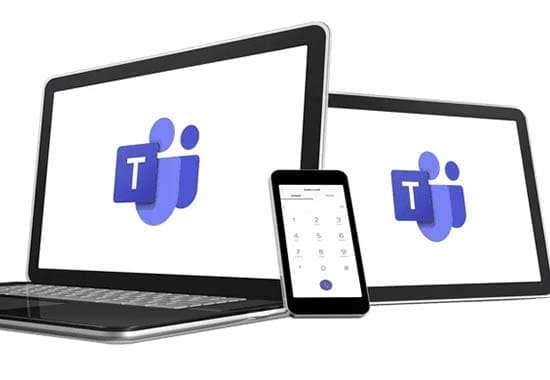
Microsoft Teams Phone allows employees to make and receive external telephone calls through Microsoft Teams.
This can bring chat, video meetings, internal collaboration and business calls together within one familiar application.
Users can operate through headsets, computers, mobile devices and compatible Teams desk phones.
We can review Microsoft licensing, call routing, telephone numbers and connectivity before planning a Teams Phone deployment.
One Familiar Application
Employees can manage chat, meetings and external telephone calls through Microsoft Teams.
Remote and Hybrid Working
Users can access their business telephone service from authorised computers and mobile devices.
Business Telephone Numbers
Existing numbers can often be retained and moved into a suitable Teams calling arrangement.
Call Queues
Route calls to groups of users and manage incoming departmental or customer-service calls.
Auto Attendants
Use automated menus and routing rules to direct callers to the right team.
Microsoft 365 Integration
Bring calling into the wider Microsoft 365 environment used by your employees.
Microsoft Teams does not automatically include external calling
Organisations may need suitable Microsoft licensing, telephone-number services and calling connectivity before Teams can replace a traditional business telephone system.
What Is Required for Microsoft Teams Phone?
A successful Teams Phone deployment needs more than simply installing the Teams application.
Microsoft licensing, number porting, call routing, user configuration, headsets, devices and internet connectivity all need to be planned.
We can review these requirements alongside our Microsoft 365 services .
Business Phone System Comparison
| Phone System | How It Works | Typical Benefits | Suitable For |
|---|---|---|---|
| Cloud VoIP | Hosted phone service delivered through an internet connection | Flexibility, scalability, remote working and reduced local hardware | Most small, medium and multi-site organisations |
| Microsoft Teams Phone | External calls delivered through Microsoft Teams | One application for meetings, chat and telephone calls | Businesses already working heavily within Microsoft 365 |
| On-premise system | Telephone equipment installed and managed at the premises | Local control and support for specialist configurations | Organisations with specific infrastructure or operational needs |
| Hybrid system | Combination of cloud and locally installed telephone services | Supports staged migrations and mixed requirements | Complex, specialist or larger environments |
Desk Phones, Headsets and Applications
A modern phone system can support several different ways of making and receiving calls.
Some users may prefer a traditional desk handset, while remote workers and mobile employees may work more effectively through computer and mobile applications.
We can recommend equipment based on employee roles, call volumes, working locations and personal preferences.
User equipment can include:
- Standard desk phones
- Executive desk phones
- Reception consoles
- Cordless handsets
- Conference phones
- USB and Bluetooth headsets
- Computer softphone applications
- Mobile phone applications
- Teams-compatible devices
- Analogue telephone adapters
Call routing can include:
- Main business numbers
- Direct dial numbers
- Departmental numbers
- Hunt groups
- Call queues
- Auto attendants
- Time-of-day routing
- Holiday messages
- Overflow destinations
- Out-of-hours voicemail
- Remote-worker extensions
- Emergency call routing
Professional Call Flow Design
The way incoming calls are handled can have a significant effect on customer experience.
We map your main number, departments, working hours, overflow arrangements and out-of-hours requirements before configuring the system.
This helps ensure callers reach the right team and reduces the risk of important enquiries being missed.
Call Reporting and Management
Telephone reporting can help organisations understand call demand and identify missed opportunities.
Missed Calls
Identify unanswered calls and the times or departments where they occurred.
Call Volumes
Review incoming and outgoing call activity across the business.
Queue Performance
Monitor queue waiting times and how quickly calls are being answered.
Busy Periods
Identify the days and times when additional call coverage may be required.
Call Recording for Business
Call recording can support staff training, quality assurance, dispute investigation and certain compliance requirements.
Recording should only be implemented with a clear business purpose, appropriate permissions, secure storage and a documented retention approach.
We can explain the available recording options and configure suitable access permissions for authorised employees.
Recording every call is not always necessary
Some businesses may only need to record selected users, departments or incoming numbers.
The recording policy should reflect the organisation's operational and data-protection requirements.
Multi-site telecoms can provide:
- One phone system across all locations
- Shared internal extension numbers
- Centralised call routing
- Consistent voicemail settings
- Shared reception coverage
- Site-to-site internal calling
- Centralised management
- Common reporting
- Remote-user support
- Business continuity options
Multi-Site Business Phone Systems
A cloud telephone system can connect offices, branches, warehouses and remote employees through one communications platform.
Employees can transfer calls between locations, use shared directories and operate under a consistent call-flow structure.
This can simplify management and provide customers with a more consistent experience across the organisation.
Business Continuity for Your Phone System
Business phone systems should be planned around what happens when an office, internet connection or local device becomes unavailable.
Cloud systems can allow calls to be redirected to alternative users, mobile applications, other sites or temporary numbers.
Where communications are business-critical, we may also recommend backup connectivity and documented emergency routing.
Continuity planning can include:
- Alternative call destinations
- Mobile application access
- Home-working capability
- Secondary business locations
- 4G or 5G backup connectivity
- Secondary broadband services
- Out-of-hours announcements
- Emergency call-flow plans
- Documented administrator access
- Regular failover testing
What to Review Before Changing Phone Provider
Existing Contracts
Confirm the end dates, notice periods and settlement obligations attached to current services.
Telephone Numbers
Create a complete list of main numbers, direct dials, freephone numbers and specialist lines.
User Numbers
Identify active employees, shared phones, spare extensions and expected future growth.
Call Features
Record the current call routing, queues, recordings and reporting requirements.
Connectivity
Check whether broadband and network infrastructure can support the replacement system.
Specialist Devices
Identify door-entry systems, alarms, lifts, fax services and analogue equipment.
Do not cancel your existing service before number porting is complete
Cancelling the existing account too early may place important telephone numbers at risk.
Number transfers should be coordinated as part of the wider migration plan.
Business Telephone Number Porting
In most cases, existing business telephone numbers can be retained when moving to a new provider.
The number porting process requires accurate account information and coordination between the existing and new suppliers.
We can identify the numbers being transferred, submit the relevant porting requests and coordinate the changeover.
Our Business Phone System Installation Process
1. Discovery
We review your users, sites, numbers, contracts, connectivity and current call handling.
2. Design
We plan the platform, handsets, applications, call flows, licensing and resilience.
3. Proposal
A clear recommendation is provided covering monthly costs, equipment and implementation.
4. Migration
Number porting, installation, user setup and testing are coordinated.
5. Support
Ongoing technical support and assistance with users, features and account changes are provided.
Who We Support
Our business telecom and phone-system services are suitable for:
- Small and medium-sized businesses
- Multi-site organisations
- Professional services firms
- Construction and property companies
- Schools and education providers
- Manufacturing and engineering businesses
- Retail and hospitality organisations
- Charities and not-for-profit organisations
- Remote and hybrid workforces
- Businesses moving to Microsoft Teams Phone
The right telephone system should reflect how your business works
User numbers, call volumes, sites, working patterns and customer-service requirements can all affect the design.
We build the recommendation around your organisation rather than forcing every customer onto one standard setup.
Why Choose Digital Office Group?
Digital Office Group provides business phone systems alongside broadband, mobile, managed IT, cyber security and wider workplace technology.
Our telecommunications services are delivered through Tetra Communications, the dedicated telecoms arm of Digital Office Group.
As a family-owned business established in 1994, we support organisations across the Midlands and throughout the UK.
Our ability to review the telephone system, internet connection, network and wider technology together helps create a more reliable business communications solution.
Why work with us?
- Family-owned and established in 1994
- Dedicated telecoms specialists
- Cloud VoIP phone systems
- Microsoft Teams Phone
- On-premise and hybrid options
- Number porting support
- Business handsets and headsets
- Broadband and leased-line expertise
- Ongoing UK-based support
- One supplier for wider workplace technology
Business Phone System FAQs
What is a VoIP phone system?
A VoIP phone system uses an internet connection to make and receive calls instead of relying entirely on traditional telephone lines.
What is a cloud phone system?
A cloud phone system is hosted by a service provider and accessed through the internet using desk phones, computers and mobile applications.
Can we keep our existing business telephone numbers?
In most cases, existing numbers can be transferred to a new provider through the standard number-porting process.
Can employees use the system from home?
Yes. Suitable cloud phone systems can allow employees to use desk phones, computer applications or mobile applications away from the office.
Can Microsoft Teams replace our business phone system?
Microsoft Teams can support external business calls when the correct licensing, calling service, numbers and configuration are in place.
Do we need new desk phones?
This depends on the new platform and whether your existing handsets are compatible. Some users may work entirely through applications and headsets.
What happens if our internet connection fails?
Calls may be redirected to mobile applications, alternative numbers or another site. Backup broadband can also provide additional resilience.
Can a phone system connect several offices?
Yes. Cloud telephony can connect several sites through one platform, shared directory and centralised call-routing structure.
Can you provide call recording?
Yes. Suitable systems can provide call recording for selected users, teams or telephone numbers.
Can you provide call reporting?
Yes. Reporting can show call volumes, missed calls, queue performance and other useful operational information.
Can you take over our existing phone system?
Yes. We can review the current platform, contracts, telephone numbers, handsets and connectivity before recommending a migration.
How much does a business phone system cost?
Pricing depends on user numbers, handsets, call features, licensing, connectivity, installation and contract term.
Is Your Current Phone System Holding Your Business Back?
Arrange a free telecoms review with Digital Office Group. We will assess your current system, bills, contracts, users, telephone numbers and connectivity before recommending a suitable VoIP, Microsoft Teams, cloud or on-premise solution.
Request Your Free Telecoms Review Call 01530 414 409